
Nations Info Corp
Partnered with stakeholders to redesign web and mobile experiences for a rent-to-own platform, creating interactive prototypes and scalable systems.
Overview
Nations Info Corp is a California-based technology company founded in 2005 that synthesizes real estate, credit, and financial data into user-friendly digital platforms — empowering consumers and professionals through data-driven products. As a UX Design Intern, I worked on a client project: redesigning the homepage and search experience for a rent-to-own realty website, working within a Jira + Scrum setup alongside the business owner, product team, and engineering stakeholders.
This internship is where I built the technical foundation of my design practice: Figma components and variants, the 8-point grid system, responsive layout, layer organization, prototyping, and style guide development.
The Challenge
The existing website reflected a dated 2000s–2010s aesthetic — basic search bars, simple button-to-page navigation, and no coherent design system. It hadn't been updated in years.
The business owner gave me two important pieces of context:
The audience: Users pursuing rent-to-own were often financially stressed and unfamiliar with the process. The site needed to act less like a search tool and more like a calm, step-by-step guide that made homeownership feel approachable.
The content challenge: The business owner wanted to include a significant amount of educational text. The design challenge was how to present that information without creating clutter or cognitive overload.
My task: modernize the experience, align design decisions with business needs, and create an interface that felt calming, guiding, and trustworthy.
Research & Insights
My understanding of the audience came from direct conversations with the business owner, supplemented by independent research into how rent-to-own businesses operate — so I could translate the process into a user-friendly flow. I also conducted a competitive analysis of other realty platforms.
Four key insights shaped every design decision:
Visual hierarchy is essential — users needed a clear, sequential guide rather than a wall of information.
Information overload causes stress — dense text blocks had to be broken up with generous spacing and structure.
Aesthetics influence emotions — calming colors, rounded corners, and open layouts help reduce anxiety for users in stressful situations.
Professional, not playful — warmth and approachability mattered, but so did trust and authority.
These insights led me to draw on bento-style web design — a modular approach that organizes information into clearly bounded, visually distinct blocks, making complex content digestible without sacrificing professionalism.
Process
I followed a structured design workflow throughout:
Wireframes → Lo-Fi → Hi-Fi → Prototype — Three iterations of the homepage and search flow, refined through stakeholder feedback and usability considerations.
Initial Design — Classic Real Estate Inspiration
Before developing the final direction, I spent significant time studying other real estate and rent-to-own websites — analyzing their layouts, hierarchy, and content structure. This research informed a first homepage design that followed the conventions of the category: a prominent search bar, feature sections, and a structured content layout.
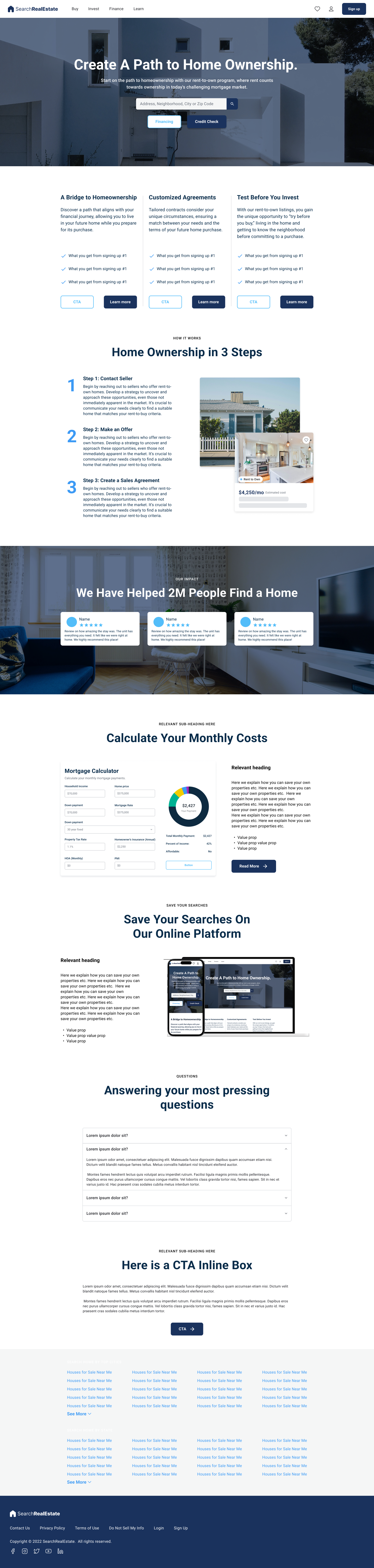
Initial homepage — inspired by conventional real estate layouts after competitive research.
Final Design — Modern Bento Direction
After meeting with the business owner to assess needs more deeply, I was directed to push toward a more modern aesthetic. I redesigned the homepage using bento-style layout principles — modular, clearly bounded sections with generous spacing and visual structure.

Final desktop design — bento-style layout with calming palette, custom graphics, and clear hierarchy.
Component Building & Prototyping
During this process I developed complex Figma skills I hadn't used before — building components with variants, organizing layers at scale, and prototyping interactive flows. One example was building a carousel component from scratch, learning how to structure it for both design consistency and engineering handoff.
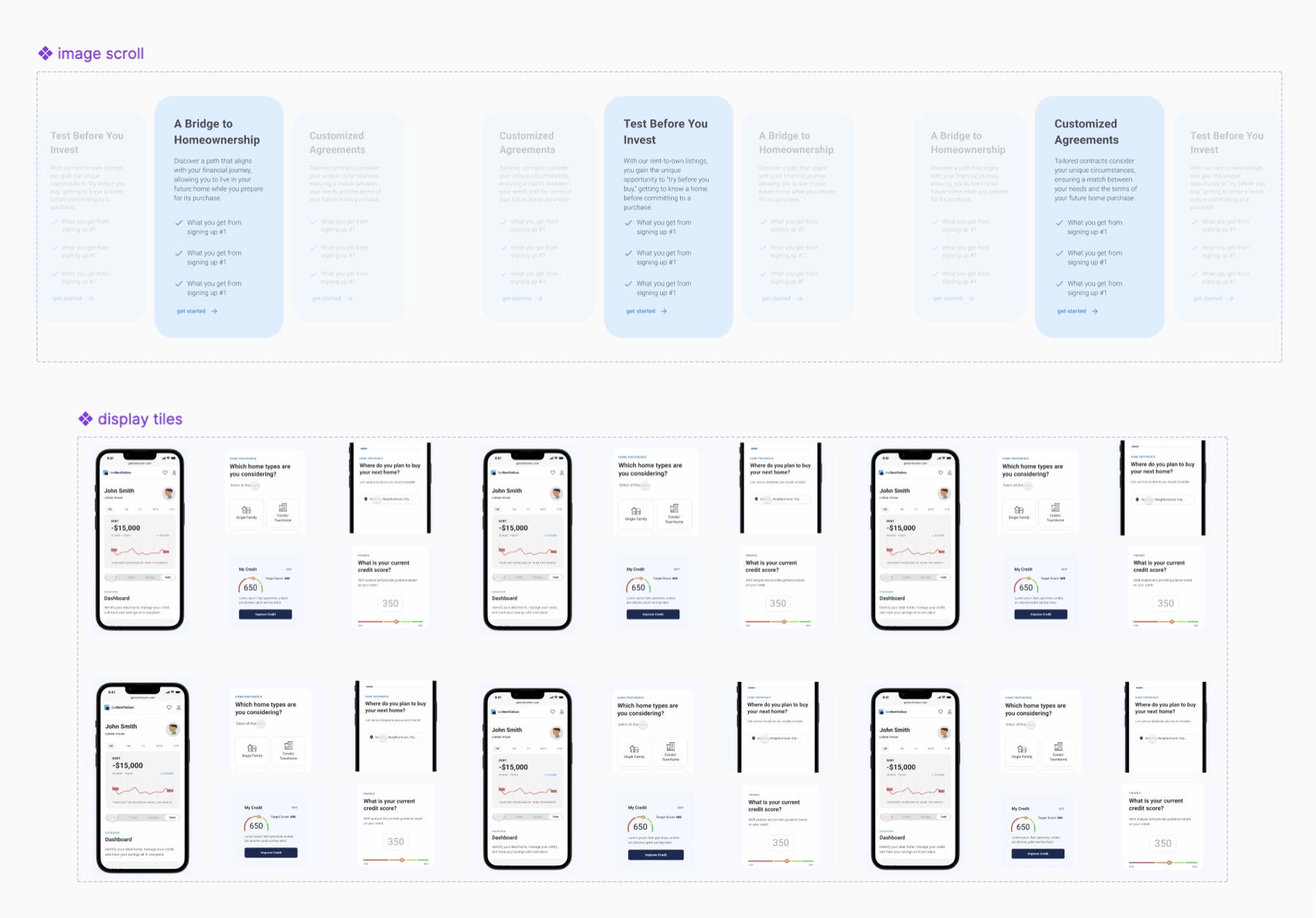
Component building — designing and prototyping the carousel in Figma, including variants and interaction states.
Hover over image to magnify
Style Guide Development — Initially working from an existing guide, I later received permission to update fonts and colors to better reflect the modernized aesthetic. I built a new style guide covering buttons, components, and interactive states.
Jira + Scrum Collaboration — My work was managed through Jira tickets tied to two-week sprints. I attended daily scrum meetings, shared progress with the product team, and incorporated engineering constraints directly into design decisions.
Mobile Prototype — Final Screens
I translated the desktop design to mobile and prototyped the full experience, including animated GIFs of the site's features embedded in the screens. These were received especially well by the executive team during the final presentation.
Solution
The redesigned homepage and search flow created a modern, calming entry point for users navigating rent-to-own.
Homepage structure:
- A central hero search bar with immediate options for financing and credit checks — surfacing the most urgent user needs upfront
- A three-feature overview section with clear visual hierarchy
- A "Home Ownership in 3 Steps" section with custom graphics I created to explain the process in approachable visuals
- Bento-style feature boxes with embedded animated GIFs demonstrating core functions
- An FAQ section and persistent CTAs so users always knew their next step
Visual design decisions:
- Sans-serif typeface for clarity and trust
- A calming palette of blues and grays on a white background — open, readable, professional
- Rounded corners and generous spacing to reduce stress without sacrificing authority
Interaction design highlights:
- A carousel for text-heavy content, distributing information across slides to prevent clutter
- Animated phone screen prototypes bridging static layouts and real user flows
- A hero section balancing three business owner CTAs while maintaining clear visual hierarchy
Outcome
The business owner was pleased with the clean, modern direction. During the final presentation, the product and engineering teams gave positive feedback — specifically praising the open layout and animated prototypes for making features feel tangible. They noted that some vector graphics could be adjusted to feel less playful, but emphasized this was a minor refinement and expressed genuine enthusiasm for the overall work.
"Tanvi played a key role in redesigning the user experience for one of our real estate platforms. She demonstrated strong UX design skills, creating modern, user-centered designs in Figma while collaborating closely with stakeholders to incorporate feedback and align her work with business objectives. Her attention to detail, thoughtful design decisions, and ability to translate requirements into intuitive user experiences stood out throughout the project. Beyond her design capabilities, Tanvi consistently demonstrated professionalism, curiosity, and a strong willingness to learn."— Krishna Govindarajan, VP of Engineering, Nations Info Corp
Reflection
This internship gave me the technical UX foundation I use in every project today — Figma components and variants, the 8-point grid system, responsive design, layer organization, prototyping, and style guide development.
Working within a Jira + Scrum setup taught me how design fits into an agile process: how tickets are created and tracked, how sprints are paced, and how to present design decisions to cross-functional teams in a way that bridges user needs and business priorities.
Most importantly, I learned what it means to translate user empathy into production-ready deliverables — designing not just for how something looks, but for how it makes someone feel when they're in a stressful situation and need a system to trust.